

Description
Seamless Virtual Meetings from Google Calendar
Overview
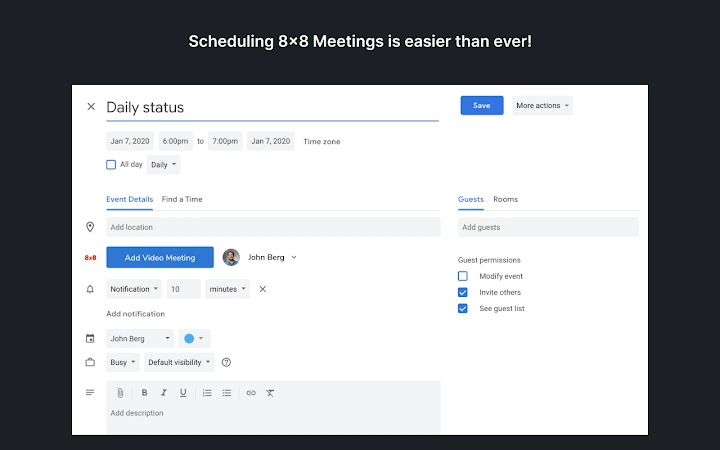
The 8x8 Virtual Office Meetings extension for Google Calendar is designed to simplify remote and hybrid team collaboration by enabling users to schedule and manage virtual meetings directly within their Google Calendar interface. This tool eliminates the need to switch between platforms, allowing users to initiate a meeting with a single click. The integration supports real-time availability checks, helping teams find suitable meeting times without back-and-forth communication. Once scheduled, meeting invitations are automatically generated with essential details, including a web link for online participation.
Target users include professionals in distributed teams, remote workers, and organizations leveraging Google Calendar for daily scheduling. The software is particularly useful for businesses already using 8x8 Virtual Office Pro, as it requires no additional setup beyond installing the extension. Real-world usage scenarios include team stand-ups, client consultations, cross-departmental planning, and virtual onboarding sessions—all managed efficiently within a familiar calendar environment.
Developed by 8x8, the extension is part of a broader suite of collaboration tools aimed at improving workplace connectivity. While specific developer background details are not publicly available, the product is positioned as a productivity-enhancing utility for modern workforces. The integration supports seamless updates to meetings directly from the calendar, ensuring all participants receive timely changes without manual intervention.
Key Features & Capabilities
- One-Click Meeting Scheduling – Initiate a Virtual Office Meeting directly from Google Calendar with a single action, reducing friction in the scheduling process.
- Real-Time Availability Sync – View the availability of attendees in real time, enabling efficient time selection across different time zones.
- Automated Invitation Generation – Automatically generate and send email invitations with meeting links, agendas, and joining instructions.
- Direct Calendar Integration – Modify meeting details such as time, duration, or participants directly in Google Calendar; changes sync instantly with 8x8 Virtual Office.
- Seamless Updates & Notifications – When changes are made in the calendar, updated invitations are sent to all attendees without requiring login to the 8x8 platform.
These features streamline workflows for teams that rely heavily on scheduled collaboration. For example, a project manager can adjust a client meeting time and immediately notify all stakeholders via updated calendar invites. Similarly, a remote team can coordinate daily stand-ups without leaving their primary calendar interface. The extension enhances productivity by minimizing context switching and ensuring all participants receive consistent, up-to-date information.
User Interface, Workflow & Performance
The user interface of the 8x8 Virtual Office Meetings extension is designed to integrate seamlessly with the Google Calendar environment. It appears as a dedicated button or menu option within the calendar’s scheduling panel, maintaining visual consistency with Google’s UI standards. Navigation is intuitive, requiring minimal learning, as users interact with familiar calendar elements.
Workflow efficiency is significantly improved by the extension’s ability to handle meeting creation, updates, and communication in a single location. Users can initiate a meeting, review attendee availability, make adjustments, and send invitations—all without leaving the calendar. The extension operates in the background, minimizing interruptions to the user’s workflow.
Performance details were not specified by the developer. However, based on typical behavior of browser-based extensions, the tool is expected to operate with low latency and minimal impact on system resources. The extension’s lightweight size of 1.3 MB suggests efficient resource usage. Stability is likely maintained through integration with Google’s secure extension framework, though specific reliability metrics were not provided.
Compatibility & System Requirements
The 8x8 Virtual Office Meetings extension is compatible with both Windows and Mac operating systems. It functions as a browser extension, meaning it runs within supported web browsers such as Chrome, Firefox, or Edge. The extension requires the presence of an existing 8x8 Virtual Office Pro account to operate, indicating a dependency on the core platform.
Installation size is 1.3 MB, which is compact and suitable for most modern systems. The software version is 1.0.1, indicating a stable release. Exact system requirements were not listed, but compatibility with current versions of Windows and Mac suggests minimal hardware demands. The developer did not specify CPU or RAM usage, so performance under heavy workloads remains unspecified.
Pros and Cons
Pros
- Effortless integration with Google Calendar for instant meeting scheduling
- Real-time availability checks improve meeting planning efficiency
- Automated invitations with joining links reduce setup time
- Direct edits in calendar sync instantly with 8x8 Virtual Office
- Lightweight design at only 1.3 MB
- Free to use with no cost barrier for adoption
Cons
- Requires an existing 8x8 Virtual Office Pro account for functionality
- Compatibility limited to users with access to the 8x8 platform
- Performance and resource usage details not publicly disclosed
- Dependent on browser extension support and updates
- No standalone desktop application available
FAQ Section
Is the 8x8 Virtual Office Meetings extension free to use?
Yes, the extension is available at no cost. It is included as part of the 8x8 Virtual Office Pro offering, requiring no additional licensing fees.
What operating systems does the extension support?
The extension is compatible with both Windows and Mac systems. It runs within supported web browsers and does not require a separate desktop installation.
Do I need a specific account to use this tool?
Yes, access to the 8x8 Virtual Office Meetings extension requires an active 8x8 Virtual Office Pro account. Users should contact their system administrator for setup assistance.
Can I use this tool offline?
No, the extension requires an active internet connection to function. It relies on real-time synchronization with Google Calendar and the 8x8 platform.
How often are updates released?
Updates are managed through the browser’s extension store. The latest version, 1.0.1, was released on March 15, 2024. Automatic updates are typically enabled by default in most browsers.
Final Thoughts
The 8x8 Virtual Office Meetings extension delivers a streamlined, efficient solution for teams that rely on Google Calendar for scheduling. By embedding virtual meeting capabilities directly into the calendar interface, it reduces friction in collaboration workflows and enhances meeting productivity. Its ability to sync changes instantly and send updated invitations ensures that all participants remain informed without manual effort.
While the tool is limited to users with an 8x8 Virtual Office Pro account, its seamless integration, lightweight design, and zero cost make it a compelling choice for organizations already invested in the 8x8 ecosystem. For remote and hybrid teams seeking a reliable way to schedule and manage virtual meetings, this extension offers a practical and user-friendly approach.
Download 8x8 Virtual Office Meetings now
Guides & Tutorials for 8x8 Work Meetings Extension for Chrome
How to install 8x8 Work Meetings Extension for Chrome
- Click the Preview / Download button above.
- Once redirected, accept the terms and click Install.
- Wait for the 8x8 Work Meetings Extension for Chrome download to finish on your device.
How to use 8x8 Work Meetings Extension for Chrome
This software is primarily used for its core features described above. Open the app after installation to explore its capabilities.
User Reviews for 8x8 Work Meetings Extension for Chrome 0
No reviews found





